CXT Academy · Field guide2026 edition

The AI Starter Stack

10 ways creatives can build a business with AI

The tools, the real costs and the first steps. For designers, editors, motion designers, writers, photographers and developers, anywhere in the world. Prices checked October 2026.

  • PDF · 46 pages
  • 10 business plays
  • Top 8 tools
  • 55 numbered sources

Education, not financial advice. Nothing in the guide is a promise of income.

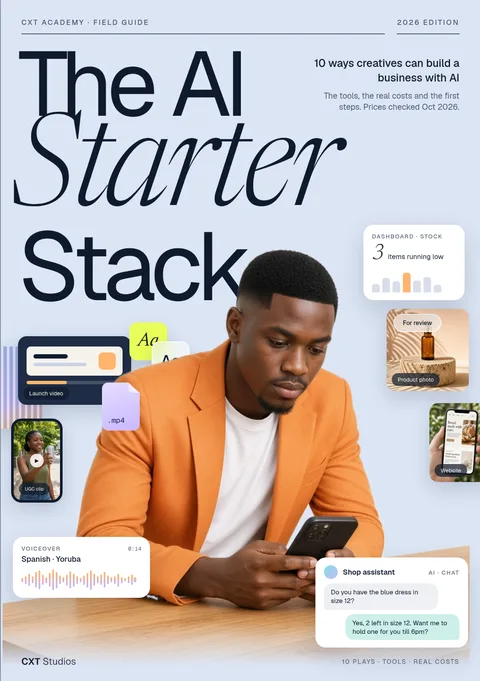
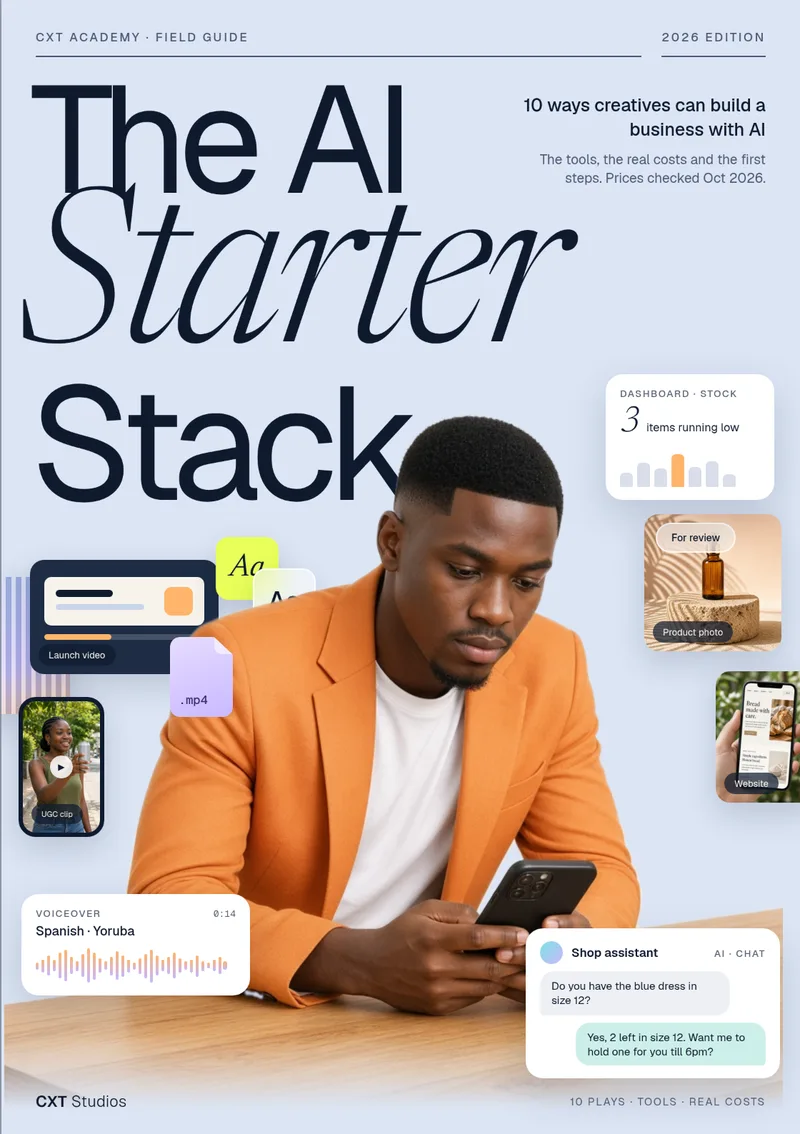
Cover of The AI Starter Stack: 10 ways creatives can build a business with AI, by CXT Studios PDF · $10
In numbersReal costs, checked Oct 2026
10business plays, one chapter each
8starter tools, with what they cost
+10bonus quick ideas
55numbered sources at the back
What’s insideContents

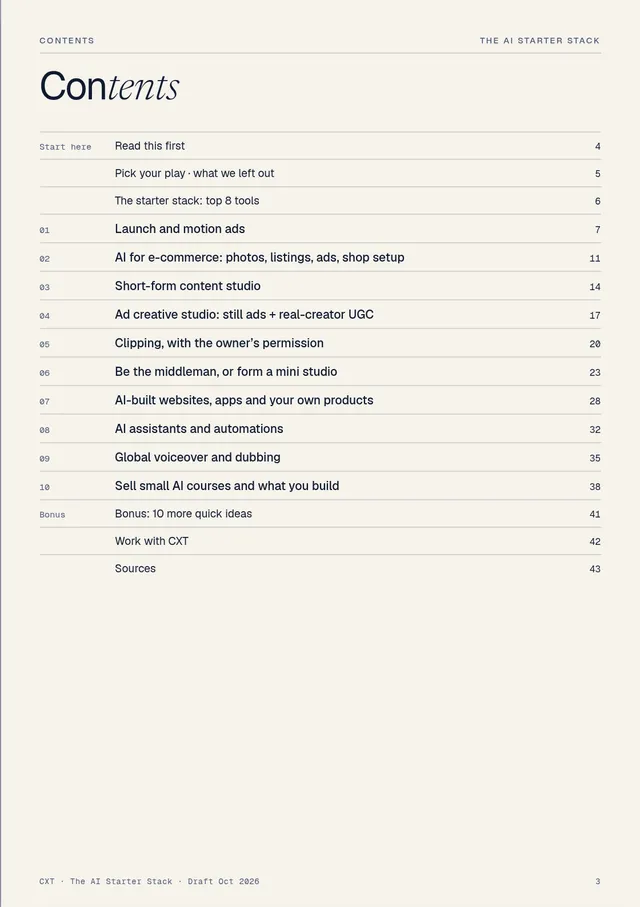
Ten plays, one chapter each

Every chapter follows the same shape: what it is and who pays, the tools and what they cost, how to start step by step, your first client, pricing guidance and what to watch out for.

  1. 01Launch and motion adsp7
  2. 02AI for e-commerce: photos, listings, ads, shop setupp11
  3. 03Short-form content studiop14
  4. 04Ad creative studio: still ads + real-creator UGCp17
  5. 05Clipping, with the owner’s permissionp20
  6. 06Be the middleman, or form a mini studiop23
  7. 07AI-built websites, apps and your own productsp28
  8. 08AI assistants and automationsp32
  9. 09Global voiceover and dubbingp35
  10. 10Sell small AI courses and what you buildp38
  11. +Bonus: 10 more quick ideasp41

Also: Read this first · Pick your play (a matrix by skill and tool budget) · What we left out, and why · Work with CXT · Sources.

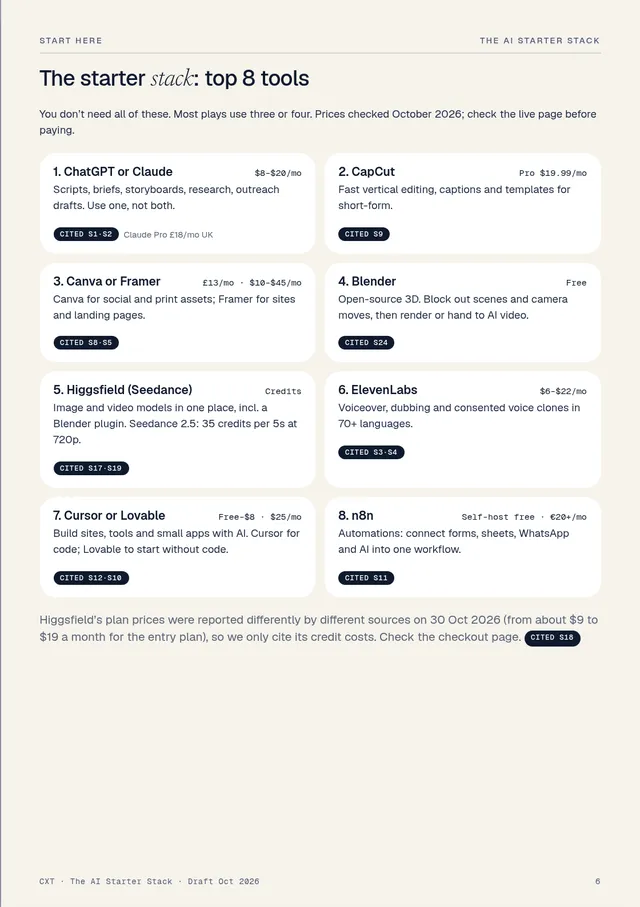
The starter stack: top 8 tools

You don’t need all of these. Most plays use three or four.

ChatGPT or Claude$8–$20/mo

Scripts, briefs, storyboards, research, outreach drafts.

CapCutPro $19.99/mo

Fast vertical editing, captions and templates.

Canva or Framer£13 · $10–$45/mo

Social and print assets; sites and landing pages.

BlenderFree

Open-source 3D: block out scenes and camera moves.

Higgsfield (Seedance)Credits

Image and video models in one place, incl. a Blender plugin.

ElevenLabs$6–$22/mo

Voiceover, dubbing and consented voice clones.

Cursor or LovableFree–$25/mo

Build sites, tools and small apps with AI.

n8nFree · €20+/mo

Automations: forms, sheets, WhatsApp and AI.

Prices as listed in the guide, checked October 2026. Tools change prices often, so the guide tells you to check the live page before paying.

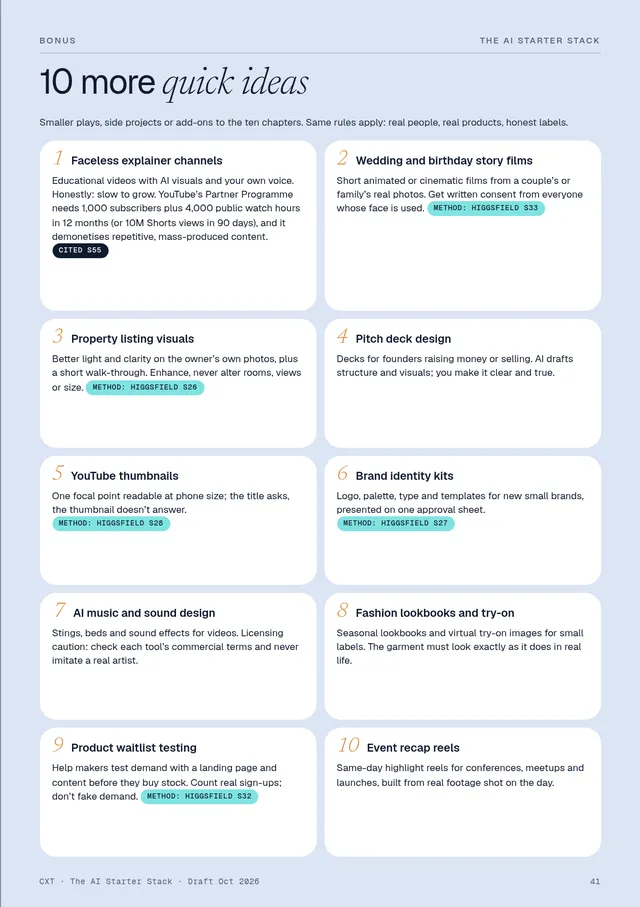
Bonus: 10 more quick ideas

Faceless explainer channels, wedding and birthday story films, property listing visuals, pitch decks, YouTube thumbnails, brand identity kits, AI music and sound design, fashion lookbooks, product waitlist testing and event recap reels.

Every number is labelled

Cited S1 from a source, numbered at the back (55 in total)

Estimate our arithmetic, not a measured cost

Guidance how to think about price, not a quote

Method a creator’s method, summarised and credited

Who it’s forGlobal · beginner-friendly

For creatives who want paid work, not hype

It isn’t about getting rich. It’s about choosing one realistic play and doing the first steps well: three samples, ten real conversations, one small fixed-price job in 30 days.

You animate already

Start with launch and motion ads (chapter 1), then the ad creative studio.

You shoot or retouch

AI for e-commerce: product photos, listings, ads and shop setup.

You edit video

A short-form content studio, or clipping with the owner’s permission.

You write or build

AI-built websites, apps and products, or assistants and automations.

You speak two languages

Global voiceover and dubbing.

You know lots of people, or can teach

Be the middleman or form a mini studio, or sell small courses.

It’s for you if

  • You have a creative skill and want to turn AI into paid client work.
  • You want real tool prices and sources, not screenshots of someone’s earnings.
  • You’d rather do one thing well for 30 days than try five ideas at once.

It’s not for you if

  • You want “$10k a month in 30 days”. The guide treats that as a sales pitch.
  • You want AI influencer personas or mass-produced spam content. Both are left out on purpose, and the guide explains why.
Free sampleChapter 1 in full

Read chapter 1 free

The whole first chapter, as it appears in the book. If it’s useful, the other nine work the same way.

Download the free sample PDF (pages 1–10, 1 MB)
Skill: motion basicsTools: ~$0–$60/mo est.Who pays: launches

Launch and motion ads

Turn product launches into short, on-brand motion clips for software companies, crowdfunding campaigns and online sellers. This is the lane CXT Studios works in.

What it is

Short clips (usually 10–30 seconds) cut in 16:9, 9:16 and 1:1 for each release: feature reveals, interface walkthroughs, logo stings and “now live” teasers. AI speeds up the scripting, storyboarding and rough motion; your taste does the rest.

Who pays

  • Software and AI startups shipping features every few weeks.
  • Crowdfunding campaigns (Kickstarter and similar) that need a clearer story while the campaign is live.
  • Online sellers launching a product on Amazon, Shopify or Etsy.

Price context

£250–£900

a day: what UK freelance motion designers charge, by seniority. Upwork London: $36–$50/hr. Cited S35

Third-party benchmarks, not what you will earn.

Tools and cost

ChatGPT / ClaudeScripts, storyboards, code for motion$20/mo · £18/mo UK Cited S1·S2
HiggsfieldStoryboard frames, then animate (Seedance)Credits: 35 per 5s clip at 720p Cited S17
RemotionCode-driven motion templatesFree for individuals Cited S2
Blender3D blockouts and camera movesFree Cited S24
ElevenLabsVoiceover$6–$22/mo Cited S3
After EffectsHero polishIf you own it
Monthly tools to start~$0–$60/mo Estimate

Pricing guidance Guidance

Sell a fixed launch pack (for example one hero clip plus two cut-downs), not hours. Estimate the days it will take, check against the day-rate range above for your market and level, then round to a package price. Put revision rounds and delivery formats in writing.


Start this week
  1. Build one reusable template. Type styles, easing, transitions and a sound bed you can re-skin for any brand.
  2. Storyboard, then animate. Write a one-paragraph brief, generate about eight key frames as stills, fix them until they read as a story, and only then animate each frame. Use clean, classic motion for digital products and bolder 3D “hyper-motion” for physical ones. Method: Higgsfield S25
  3. Make 2–3 spec clips from public changelogs or your own product. Label them “spec, not commissioned”.
  4. Post a breakdown: one release, three formats, and what you changed between storyboard and final.

CXT ran this stack as an internal test: six launch clips from one brief (29 Oct 2026). A test, not client work.

Your first client

  • Founders who just posted a release or a changelog.
  • Crowdfunding campaigns that are live but under-explained.
  • A Contra service listing with your launch pack and spec clips.
  • Send 10–15 personal notes with a relevant spec clip, not 200 automated emails. Never let an AI tool send outreach for you. Method: Higgsfield S31·S25

Watch out for

  • The “AI look”. Wobbly logos and melting text kill trust. Keep logos, type and UI as real vector or screen recordings.
  • Credits burnt on retries. Lock the storyboard first.
  • Output licence. Commercial rights depend on your plan; Higgsfield’s free plan isn’t for commercial use. Cited S17
  • Brands in spec work. Make clear you aren’t affiliated.

Method credit: Higgsfield AI, “Claude Fable 5 + Higgsfield MCP: My Favorite Business Idea for 2026!” (YouTube, 12 Jun 2026). Summarised, not quoted. Their earnings figures are not repeated here.

Your 30-day scorecard

Day 7Three samples made and posted
Day 14Ten real conversations with potential clients
Day 21One clear offer sent, with a price
Day 30One paid job, or a clear reason to switch play

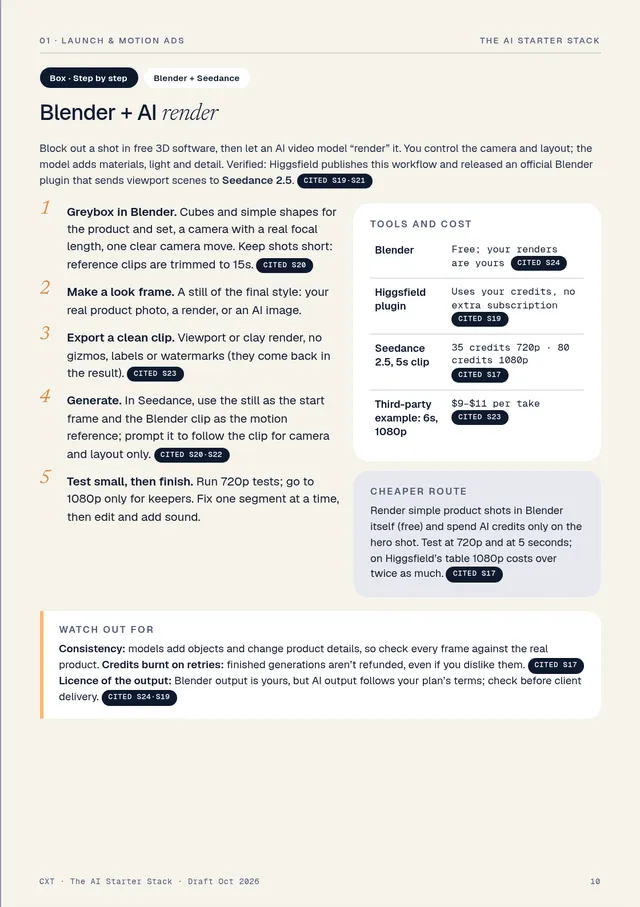
Box · Step by stepBlender + Seedance
Blender + AI render

Block out a shot in free 3D software, then let an AI video model “render” it. You control the camera and layout; the model adds materials, light and detail. Verified: Higgsfield publishes this workflow and released an official Blender plugin that sends viewport scenes to Seedance 2.5. Cited S19·S21

  1. Greybox in Blender. Cubes and simple shapes for the product and set, a camera with a real focal length, one clear camera move. Keep shots short: reference clips are trimmed to 15s. Cited S20
  2. Make a look frame. A still of the final style: your real product photo, a render, or an AI image.
  3. Export a clean clip. Viewport or clay render, no gizmos, labels or watermarks (they come back in the result). Cited S23
  4. Generate. In Seedance, use the still as the start frame and the Blender clip as the motion reference; prompt it to follow the clip for camera and layout only. Cited S20·S22
  5. Test small, then finish. Run 720p tests; go to 1080p only for keepers. Fix one segment at a time, then edit and add sound.

Tools and cost

BlenderFree; your renders are yours Cited S24
Higgsfield pluginUses your credits, no extra subscription Cited S19
Seedance 2.5, 5s clip35 credits 720p · 80 credits 1080p Cited S17
Third-party example: 6s, 1080p$9–$11 per take Cited S23

Cheaper route

Render simple product shots in Blender itself (free) and spend AI credits only on the hero shot. Test at 720p and at 5 seconds; on Higgsfield’s table 1080p costs over twice as much. Cited S17

Watch out for

Consistency: models add objects and change product details, so check every frame against the real product. Credits burnt on retries: finished generations aren’t refunded, even if you dislike them. Cited S17 Licence of the output: Blender output is yours, but AI output follows your plan’s terms; check before client delivery. Cited S24·S19


Sources cited in this chapter (from the book’s list of 55)
  • S1ChatGPT pricing (Go $8/mo, Plus $20/mo, US) · chatgpt.com/pricing
  • S2CXT AI Opportunity Scan, Oct 2026 (internal research: Claude Pro £18/mo UK, Remotion licence and more) · internal CXT research
  • S3ElevenLabs pricing · elevenlabs.io/pricing
  • S17Higgsfield, “Higgsfield Pricing Explained” (credit costs per model, refunds, free-plan limits) · higgsfield.ai/blog/higgsfield-pricing-explained
  • S19Higgsfield, “Higgsfield for Blender” (plugin, Seedance 2.5 from the viewport), 28 Oct 2026 · higgsfield.ai/blog/higgsfield-blender-plugin
  • S20Higgsfield, “Generating with Seedance 2.0” and Seedance reference-to-video API docs · higgsfield.ai/blog/generating-with-seedance-2-0
  • S21Higgsfield AI (YouTube): “How To Save AI Credits With Higgsfield + Blender” and “How To Animate a Short Film with Blender + Higgsfield”
  • S22Mitte, “How to use Blender with Seedance 2” · mitte.ai/blog/how-to-use-blender-with-seedance-2
  • S23Voyager, “Blender previs to photoreal” (third-party cost and time estimate) · voyager.so/blog/blender-previs-to-photoreal
  • S24Blender licence and FAQ (free, GPL; your renders are yours) · blender.org/about/license
  • S25Higgsfield AI (YouTube), “Claude Fable 5 + Higgsfield MCP: My Favorite Business Idea for 2026!”, 12 Jun 2026
  • S31Higgsfield AI (YouTube), “Zero to $13,457/Mo: My 24-Hour AI Agency Experiment”, 29 Jul 2026 (outreach tips only; earnings figures not repeated)
  • S35UK freelance rate benchmarks (third-party) and Upwork London motion designers

Excerpt from The AI Starter Stack © 2026 CXT Studios. Not affiliated with or sponsored by Higgsfield or any tool named.
That’s one of ten. Chapters 2–10, the top 8 tools page, the bonus ideas and all 55 sources are in the full guide.

Page previewsA5 · designed to read on a phone

A look at the pages

The AI Starter Stack cover
Get the guidePDF

The AI Starter Stack for $10

  • 10 business plays, one chapter each
  • The top 8 tools and what they cost
  • Step-by-step “start this week” plans
  • Pricing guidance and watch-outs
  • Bonus: 10 more quick ideas
  • 55 numbered sources, checked Oct 2026
Buy for $10 →

46-page PDF (A5). Price in US dollars. Education, not financial, legal or tax advice; income figures in the guide are third-party benchmarks and are not guaranteed.

FAQBefore you buy

Questions, answered

What do I get?

A 46-page PDF in A5 format: a start-here section (how to pick your play, the top 8 tools), ten chapters, a bonus page of 10 more quick ideas and a numbered list of 55 sources. It reads well on a phone, tablet or laptop.

Will this make me money?

No guide can promise that, and this one doesn’t. It’s education, not financial, legal or tax advice. Rates quoted in it are third-party benchmarks, not what you will earn. AI makes the making cheaper; it doesn’t make clients appear.

Do I need to be technical or already use AI?

No. It’s written for creatives (designers, editors, motion designers, writers, photographers and developers) and each chapter lists the tools, what they cost and the first steps. Some plays start near $0 a month in tools.

I’m not in the UK or US. Is it relevant?

Yes. It’s written for creatives anywhere in the world. Tool prices are shown as the tools publish them (mostly US dollars, some pounds and euros), and the guide reminds you to check the live price for your country.

How current are the prices?

They were checked in October 2026. Every price is either cited to a numbered source or labelled as an estimate or guidance. Tools change prices often, so always check the live page before you buy a tool.

Is it sponsored by any of the tools?

No. The guide is not affiliated with or sponsored by Higgsfield or any tool named. Some methods are summarised from Higgsfield AI’s public videos and blog, and credited where used.
Are the pictures real?

The cover and chapter photographs are AI-generated images made for the guide. They show no real people or brands.

Can I read some first?

Yes. Chapter 1 is free on this page, and you can download pages 1–10 as a PDF.